
COMFYTEMP · K4047021 NEW RELEASE · 99W
The adjustable 99W red light panel

A red light therapy panel that
aims your way

Most panels sit flat and stay there. K4047021 puts 660nm red and 850nm near-infrared light on a 360° swivel stand, so you can turn a 99W panel toward your face, back, knees or hands — then set a 5–30 minute timer and leave it alone.

Shop K4047021 → See current price on the product page · Free US shipping · 30-day returns
99W
Max output in Red + NIR mode
660 + 850 nm
Dual-chip red & near-infrared LEDs
263 mW/cm²
Measured irradiance at 6 inches
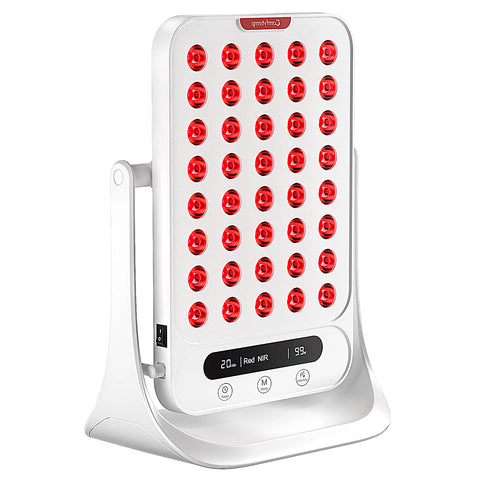
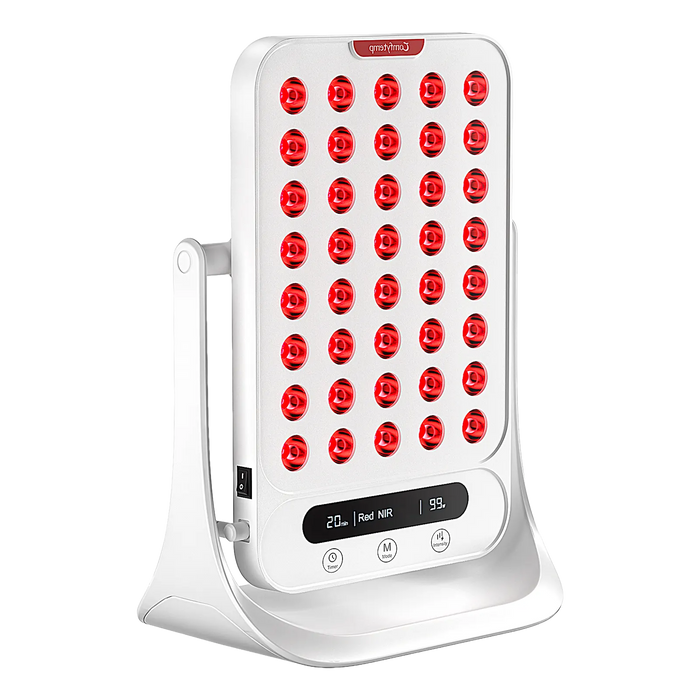
Comfytemp K4047021 99W red light therapy panel with red LEDs, digital timer display and 360-degree swivel stand
What we kept hearing

The panel that only points one way

Before building a stand-mounted panel, we looked at how people actually use them at home. The same four compromises came up again and again.

Fixed angle
The light points where the stand points. You rearrange yourself, or the furniture.
Power without context
A wattage number with no irradiance, no distance and nothing to compare it against.
One kind of session
One mode, one timer. No way to keep a short daily routine and a longer one.
It takes over the room
Large, clinical-looking hardware that ends up stored in a cupboard between uses.
Why it is different

From a flat panel to a panel that turns

K4047021 is our 99W red light panel with a 360° swivel stand, two wavelengths and published irradiance figures — built for a desk, a side table or a nightstand.

Conventional flat panel
  • One fixed angle — you move, not the light
  • A wattage figure with no distance or irradiance given
  • Usually one combined mode and one timer
  • Bulky hardware that lives in a cupboard
  • Big claims, few published numbers
K4047021 · 360° panel
  • 360° swivel stand — tilt it up, down or flat
  • 263 mW/cm² at 6 in, with all four distances published
  • 4 working modes — red, NIR, combined and pulse
  • 5–30 minute timer on a visible digital display
  • 6.7 × 10.3 in panel with 40 dual-chip LEDs
Three things we changed

Built to be aimed, not tolerated

White Comfytemp red light therapy panel with digital display shown in four adjustable stand positions

Turn it, don’t rearrange the room

The upgraded stand rotates a full 360° — face it forward, tilt it up, or lay it flat and point it down. Face, back, knees, shoulders, neck, hands or feet, without moving the table.

Irradiance and coverage chart for the Comfytemp 99W red light panel at 3, 6, 12 and 18 inches

Numbers, not just wattage

Up to 99W under Red + NIR and Pulse modes, measured at 263 mW/cm² at 6 inches. We publish the irradiance and coverage at 3, 6, 12 and 18 inches — the whole curve, not one flattering point.

Comfytemp 99W red light panel next to a football for scale, with 6.7 by 10.3 inch dimensions and touch panel

Compact enough for a desk

A 6.7 × 10.3 in white panel with 40 LEDs, a touch panel, a built-in cooling fan and a 360° swivel stand. Small enough to leave out, quiet enough to forget it is there.

What is inside

The details, plainly stated

1
660nm red + 850nm near-infrared
Dual-chip LEDs: visible red for surface coverage, near-infrared for deeper reach.
2
Up to 99W power output
Maximum power under Red + NIR and Pulse modes, shown on the digital display.
3
263 mW/cm² at 6 inches
Irradiance measured in Red + NIR mode at the 99W power level. Full distance table below.
4
4 working modes
Red, NIR, combined and pulse. Switch modes from the on-panel touch controls.
5
5–30 minute customizable timer
Set it on the display and let the timer finish on its own. No app to open.
6
360° flexible adjustable stand
Rotate and tilt toward face, back, knees, shoulders, neck, hands or feet.
7
6.7 × 10.3 in panel · 40 LEDs
White housing, touch panel and a built-in cooling fan. Made for a desk or nightstand.
8
No app, no subscription
Everything is controlled from the panel itself — nothing to pair, install or renew.
Published measurements

Irradiance and coverage by distance

Closer means higher irradiance; further away means wider coverage. These are the four measured points from the product imagery, tested in Red + NIR mode at the 99W power level.

Distance Irradiance Light area Coverage
3 in 322 mW/cm² 8 × 10 in 80 in²
6 in 263 mW/cm² 12 × 16 in 192 in²
12 in 130 mW/cm² 23 × 23 in 529 in²
18 in 69 mW/cm² 34 × 35 in 1190 in²
← Swipe the table to see all columns →

Specifications are taken from the K4047021 product page and official product imagery. Figures are product measurements, not recommended usage or treatment guidance.

A day with K4047021

Four angles, one panel

A suggested routine, not a protocol. The panel stays on the desk or the nightstand — only the angle and the timer change.

01
08:00
At the desk
Red + NIR · 20 min
Lay the panel flat and point it down toward hands and forearms while you clear your inbox. The display counts down where you can see it.
02
13:30
After a workout
Combined · 15 min
Swivel it toward knees or shoulders from a side table. No strap to fasten, nothing to hold in place.
03
19:00
On the sofa
NIR · 10 min
Angle it at your lower back from the coffee table. 850nm light is invisible, so the panel looks dimmer than the numbers suggest.
04
22:00
Winding down
Red · 5 min
The shortest timer, on the nightstand, with the panel turned slightly toward you. Then the timer simply finishes.

Timings above are illustrative. Follow the usage guidance in the user manual and on the product page.

Why we built it this way

Designed around how you use it

Three decisions behind K4047021, and the thinking behind each one.

Why publish the whole distance curve?
Irradiance changes with distance, so we measured at 3, 6, 12 and 18 inches. All four figures — 322, 263, 130 and 69 mW/cm² — sit together in one table, so you can choose the setup that suits the area you want to light.
Measured at four distances
Why a 5–30 minute timer?
Short, adjustable sessions fit a morning or an evening without asking you to plan around the device. Set the length on the touch panel and the display counts down with you.
A timer that fits your day
Why a 360° swivel stand?
A rigid stand holds the panel at a steady angle and a consistent distance, so the light lands where you aim it — a shoulder, a knee, a desk or a bedside table — while you simply sit still.
One panel, many angles
Where it fits

Six places it can point

The 360° stand was built for more than one spot. These are setup ideas based on the areas listed on the product page — bedrooms, living rooms, desks and side tables, not a clinic.

01
Face & neck
Set it on a dresser or nightstand at a comfortable distance and tilt the panel slightly toward you.
Bedroom · nightstand
02
Shoulders
Rotate the panel sideways on a side table so the light lands across one shoulder without moving the chair.
Living room · side table
03
Back & lower back
Place it on a low table behind you and adjust the tilt. The stand holds the angle so you do not have to.
Sofa · low table
04
Knees
Angle the panel down from a coffee table, or use the wider coverage at 12–18 inches for a larger area.
Coffee table · wider coverage
05
Hands & feet
Lay the panel flat and point it downward over a desk or footrest — the position shown in our product imagery.
Desk · flat position
06
A gift for the household
One panel, several angles, no sizing or fitting. A practical gift for birthdays, Thanksgiving and the holidays.
Whole family · everyday
Why Comfytemp

What stands behind it

Not claims about what our products do to your body. Just the things we can prove: how long we have been here, who uses us, and what we do if something goes wrong.

Building since 2020
Six product families across heating, red light, TENS, air compression and cooling. One design rule throughout.
500,000+ households
Devices used in living rooms, dorm rooms and offices — by people, not in clinics.
1-year warranty
365 days against manufacturing defects. If a unit fails we replace it, we do not ask you to repair it.
Support that answers
A person within one business day, plus clear product documentation available on request.
EffortlessNo setup routine, no app, nothing to calibrate before a session. AnytimeA 5–30 minute timer means a session fits into a morning or an evening. EverydayCompact enough to leave on the desk instead of packing it away.
After you order

What happens next, stated plainly

365 days
Warranty
Covered against manufacturing defects. Replacement, not repair.
30 days
Returns
Not for you? Send it back within 30 days, no explanation required.
1–3 days
US shipping
Ships from US warehouses. Tracking the same day it leaves.
1 day
Support reply
A person, within one business day. Not a bot, not a forum.

Warranty and returns follow the terms published on our policy pages. This page describes product features and setup, not medical outcomes; it is not intended to diagnose, treat, cure or prevent any disease. Follow the user manual and your own clinician’s advice.

Questions, answered

Before you decide

Which wavelengths does K4047021 use?
660nm red light and 850nm near-infrared, delivered by dual-chip LEDs. The red is visible; 850nm near-infrared is outside the visible spectrum.
How powerful is the panel?
Up to 99W under Red + NIR and Pulse modes. That is the panel’s maximum electrical output, not a measure of what any session delivers.
What does 263 mW/cm² mean?
It is the measured irradiance at 6 inches in Red + NIR mode at the 99W power level. Irradiance is not constant: we publish 322, 263, 130 and 69 mW/cm² at 3, 6, 12 and 18 inches in the table above.
How far away should I place it?
Follow the distance guidance in the user manual. The table above shows the trade-off: irradiance falls as you move back while the lit area grows from 80 in² at 3 inches to 1190 in² at 18 inches.
How long can a session run?
The built-in timer is adjustable from 5 to 30 minutes and counts down on the digital display. The range is a feature of the panel, not a recommended session length.
What are the four working modes?
Red, near-infrared, a combined Red + NIR mode and a pulse mode. The active mode and time are shown on the panel’s display, and the mode button cycles through them.
Can I point it downward or sideways?
Yes. The upgraded stand rotates 360° and the panel can be tilted up, laid flat and pointed down, or turned sideways — the four positions shown in the product imagery.
Do all 40 LEDs look lit?
Not necessarily. 850nm near-infrared light is invisible to the human eye, so in NIR-only modes the panel can appear much dimmer than it measures. This is expected behaviour, not a fault.
Is it wearable or cordless?
K4047021 is a stand-mounted panel made for a desk, side table or nightstand, with a 360° swivel stand and mains power. Its strength is holding one angle steadily while you relax nearby.
Does it need an app or a subscription?
No. Modes, power and timer are controlled from the touch panel on the device itself — nothing to pair, install or renew.
Does it have a fan?
Yes — the panel has a built-in cooling fan, shown in the product imagery alongside the touch panel and the 360° swivel stand.
What comes in the box, and what does it cost?
The current packing list, price and availability are on the K4047021 product page — they can change, so we do not repeat them here.
Is it a medical device, and does this page make health claims?
This page describes product features, measurements and setup only. It makes no claim about a health outcome and is not intended to diagnose, treat, cure or prevent any disease. Follow the user manual and your own clinician’s advice.
What if it is not for me?
Send it back within 30 days, no explanation required. Manufacturing defects are covered for 365 days, and support replies within one business day. Full terms are on our policy pages.
Ready when you are

Put the light
where you want it

Full specifications, what ships in the box and current availability are on the product page. This page was only ever meant to explain why we built the stand.

View K4047021 & Shop →

Free US shipping · 30-day returns · 1-year warranty