







K6105-Comfytemp Dual Channel TENS & EMS Unit

5.0
| 4 Reviews
$28.99
SKU: K6105

Description

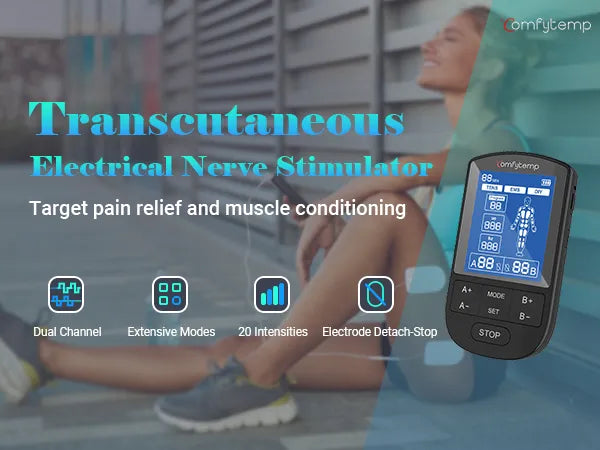
Drug-free & Multi-funcitional Relief: Comfytemp TENS unit muscle stimulator and back massager combines TENS and EMS therapies, which is a great device you can use at home for pain management. Professional back pain relief products for providing pinpoint lasting drug-free muscle pain relief from back pain, period pain, tennis elbow, carpal tunnel relief, arthritis, shoulder pain, knee pain, leg, and foot pain. Unlike other TENS units, Comfytemp provides users with multi-functional choices.
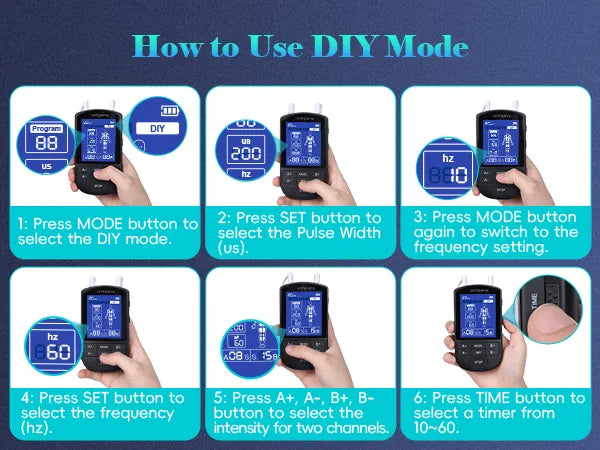
DIY Mode for Muscle Pain Relief: The TENS machine offers customized pain relief through its DIY mode. Users can freely select the frequency(1-120Hz) and pulse width(100-400us) according to their needs and try various massage techniques to match their personal comfort and treatment goals. This flexibility ensures precise targeting of muscle tension, joint stiffness, or chronic pain while optimizing muscle recovery.
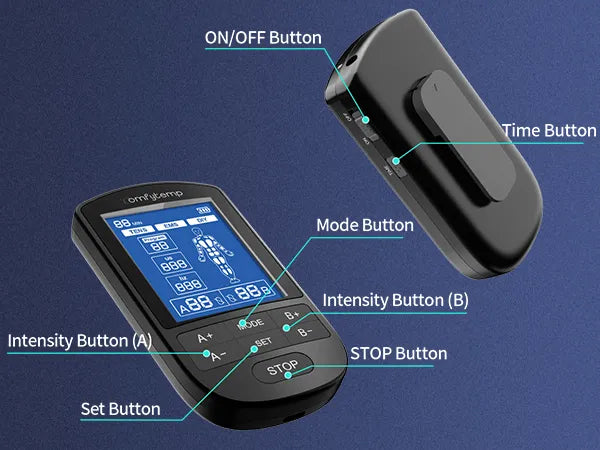
3In Large Screen & Easy Operation: Compared with the common muscle stimulator, Comfytemp portable tens unit adopts a 3-inch high-definition large screen, which is easy to read and operate. The TENS unit muscle stimulator provides a key lock function to provide you with safety protection from strong currents caused by accidental touch. The memory function to remember the last used mode and setting, say goodbye to tedious operation.
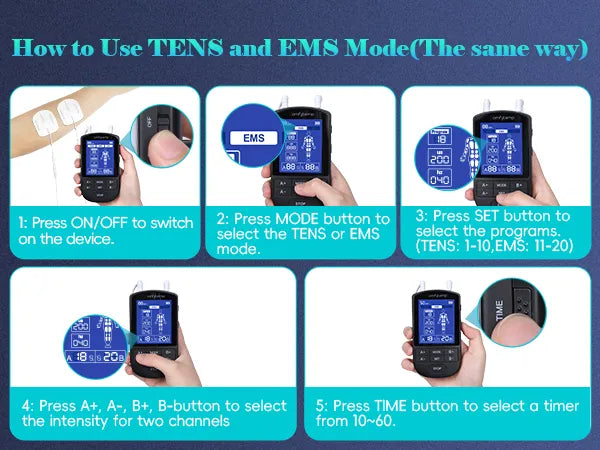
Independent Dual Channels & 20 Intensities: The pulse massager for muscles offers independent A/B dual channels, 21 modes (20 preset + 1 customizable), and 20 intensities with adjustable time (10-60mins). You can choose different intensities for channel A and channel B to meet different needs. The rechargeable TENS unit can give you continuous use for up to 21 hours.
Premium Electrode Pads: With 10 medical PET TENS pads (2x large 2.4 x 4 for back/legs; 8x small 1.8 x 1.8 for joints). Premium gel stays secure through intense workouts, yet allows painless removal from skin. When the electrode pads lose adhesion, rinse it with water, scrape off surface residue, then air-drying, adhesion will renew, enabling reuse for 60+ cycles. Attach the device to your belt/pocket via clip, and enjoy mess-free relief anywhere.

Product Highlights

  • DIY Mode
  • 20 intensity levels
  • 3-inch Large Screen, Easy to Use
STYLE
$28.99
American Express
Apple Pay
Google Pay
Mastercard
PayPal
Shop Pay
Union Pay
USDC
Visa
24 Hrs
24 Hrs
Quick Support
30 Days
30 Days
Free Return
365 Days
365 Days
Warranty
FSA/HSA
FSA/HSA
Eligible
STYLE
Description
Reviews
FAQs

A1:Common causes: Bluetooth on the mobile phone is not turned on; the device has not entered "pairing mode" (for some models, you need to press and hold the power button for 3-5 seconds until the indicator light flashes); the distance between the mobile phone and the device exceeds 10 meters (the effective distance of wireless Bluetooth).

A1:Common causes: Bluetooth on the mobile phone is not turned on; the device has not entered "pairing mode" (for some models, you need to press and hold the power button for 3-5 seconds until the indicator light flashes); the distance between the mobile phone and the device exceeds 10 meters (the effective distance of wireless Bluetooth).

A1:Common causes: Bluetooth on the mobile phone is not turned on; the device has not entered "pairing mode" (for some models, you need to press and hold the power button for 3-5 seconds until the indicator light flashes); the distance between the mobile phone and the device exceeds 10 meters (the effective distance of wireless Bluetooth).

A1:Common causes: Bluetooth on the mobile phone is not turned on; the device has not entered "pairing mode" (for some models, you need to press and hold the power button for 3-5 seconds until the indicator light flashes); the distance between the mobile phone and the device exceeds 10 meters (the effective distance of wireless Bluetooth).

A1:Common causes: Bluetooth on the mobile phone is not turned on; the device has not entered "pairing mode" (for some models, you need to press and hold the power button for 3-5 seconds until the indicator light flashes); the distance between the mobile phone and the device exceeds 10 meters (the effective distance of wireless Bluetooth).

A1:Common causes: Bluetooth on the mobile phone is not turned on; the device has not entered "pairing mode" (for some models, you need to press and hold the power button for 3-5 seconds until the indicator light flashes); the distance between the mobile phone and the device exceeds 10 meters (the effective distance of wireless Bluetooth).

Product User Manual
K4027 Red Light Panel
Download
Product User Manual
K4027 Red Light Panel
Download